Metadata Editor
The Metadata Editor application offers a user-friendly interface to create, edit, and publish metadata records.
Features
- A dashboard showing the records available on the platform as well as searching and sorting
- A metadata edition interface allowing the modification of various parts of a record (title, abstract, keywords, dates...)
- Create, duplicate and delete records
- Import remote records using a URL
- Keep a draft while editing a record, with the ability to rollback to the published version and discard changes
- A simplified "light" edition page, used by other applications (e.g. the Datahub for reuses) to let users edit a record without the full editor interface
Run & deploy
IMPORTANT
GeoNetwork version 4.2.5 or above is required for the Metadata Editor app to function normally.
The Metadata Editor application is available as a docker image or as a ZIP archive.
Using docker
The docker image is geonetwork/geonetwork-ui-metadata-editor.
See the run guide for more information.
Using the ZIP archive
A metadata-editor-VERSION.zip archive is available on every GeoNetwork-UI release: https://github.com/geonetwork/geonetwork-ui/releases
See the run guide for more information.
Deployment
Please refer to the general deploy guide to learn how to deploy GeoNetwork-UI applications.
Supported metadata schemas
The editor currently support the following schemas:
- ISO 19139
- ISO 19115-3
- DCAT-AP (support for writing values in a record is limited for now)
Any record written in one of those schemas can be opened and modified in the edition interface.
When a record is created it uses the preferred schema, currently ISO 19115-3.
How it works
The Metadata Editor relies on the GeoNetwork CRUD (create/read/update/delete) API for manipulating records. The records XML is read and modified fully in the browser to allow for a reactive experience as well as offering more possibilities for supported schemas.
Needed permissions
To view and edit records in the Metadata Editor, a user needs to have EDITOR rights on the group where the records are created.
The REVIEWER rights are also needed for the publication step.
- EDITOR
- REVIEWER
Light edition page
Opening /light-edit/{uuid} shows a simplified edition page for the given record, without the dashboard sidebar or page navigation. It is used by the Datahub to edit reuse records, but any application can link to it.
The top bar offers a "leave" button and a "save" button; there is no draft handling and no separate publication step on this page.
URL parameters
redirect_on_leave(optional): a URL-encoded absolutehttp(s)URL the user is sent back to when clicking the "leave" button. The calling application is responsible for building the complete URL, including the record's UUID if it wants the user to come back to the record's page (e.g./light-edit/{uuid}?redirect_on_leave=https%3A%2F%2Fexample.com%2Fdatahub%2Freuse%2F{uuid}). When the parameter is absent or invalid, the "leave" button is not displayed.
Marking a Dataset as "Reference Dataset"
For users with administrator privileges, an additional toggle is visible when editing a Dataset Record. This toggle allows the user to mark the Dataset as a "Reference Dataset", thus pushing forward in search results and offering additional features for it.
Prerequisite
The "Is Reference Dataset" information is stored in the form of what is called a "record flag". For this feature to work, every record flag should be created in the form of a Category on the GeoNetwork administration UI.
For this specific toggle, the category to use must be called "geonetwork-ui-flag:IS_REFERENCE_DATASET". The flag name is case-sensitive and must be exactly as specified here.
This is done on this url: /geonetwork/srv/eng/admin.console#/classification/categories, and it should look like this: 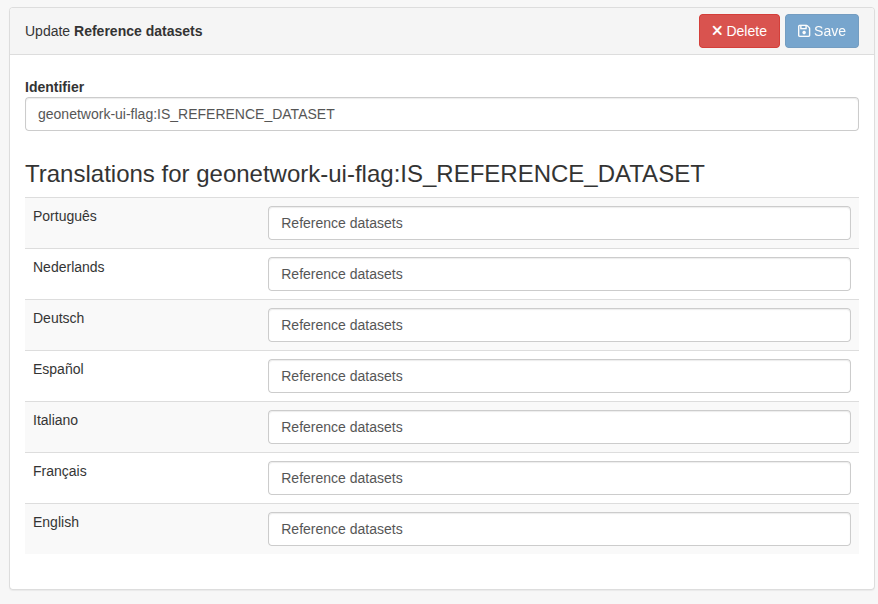
Multilingual support
Still under development
Concurrent edition
Still under development
Configuring the edition interface
Still under development